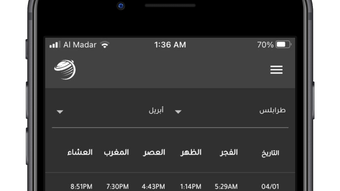

Download رؤية – Weather App for iPhone, Free Weather Tool, Middle East & North Africa Forecast
Overview
رؤية is a dedicated weather application designed for iPhone users, particularly those in the Middle East and North Africa (MENA) region. Developed by Msareef, the app serves as a lifestyle tool focused on delivering timely and accurate weather data. Its primary purpose is to help users monitor current conditions and forecasted changes, enabling better planning for daily activities, travel, and outdoor events.
The app supports location-based services, allowing users to set their current location for personalized updates or save multiple locations for quick access. This functionality is especially valuable in a region with diverse climate patterns, from arid deserts to coastal zones. While the developer did not provide additional details about the app’s technical foundation or development history, its focus on regional accuracy suggests targeted optimization for local weather systems.
Real-world usage scenarios include checking morning forecasts before commuting, monitoring storm alerts during seasonal changes, or preparing for extreme heat events common in certain areas. The app aims to simplify access to essential meteorological data through a streamlined interface, making it a practical choice for individuals seeking reliable weather insights without relying on broader global platforms.
Key Features & Capabilities
- Regional Weather Focus: Optimized for the Middle East and North Africa, offering localized forecasts tailored to regional climate patterns.
- Real-Time Weather Data: Provides current conditions including temperature, humidity, wind speed, and precipitation levels.
- Hourly and Daily Forecasts: Displays detailed predictions for the next 24 hours and extended daily outlooks to support short- and long-term planning.
- Multiple Location Support: Allows users to save and switch between several locations, ideal for travelers or those managing activities across different cities.
- Personalized Location Tracking: Automatically updates weather based on the user’s current location when enabled.
- User-Friendly Interface: Designed for intuitive navigation, ensuring quick access to key weather metrics without clutter.
These features are structured to meet the needs of users who require precise, localized weather information. For instance, a commuter in Riyadh can check hourly temperature fluctuations to decide whether to carry a jacket, while a farmer in Cairo may use the precipitation forecast to schedule irrigation. The ability to save multiple locations benefits individuals with family or business ties across the region. By centralizing essential weather data in a single, accessible interface, رؤية reduces the need to consult multiple sources, enhancing efficiency and user experience.
User Interface, Workflow & Performance
The user interface of رؤية appears to be designed with simplicity and clarity in mind, aligning with modern iOS design principles. Navigation is likely structured around a central dashboard displaying the current weather, with intuitive access to hourly and daily forecasts through swipe gestures or tab navigation. The layout emphasizes readability, using clear typography and visual indicators for weather conditions such as sun, clouds, or rain icons.
Interaction is expected to be responsive, leveraging native iPhone touch controls for smooth scrolling and selection. Workflow efficiency is supported by features like automatic location detection and quick-switching between saved locations, minimizing the number of taps required to access desired data. The developer did not specify resource usage details, so performance behavior in terms of CPU or RAM consumption remains unknown.
However, based on general software behavior patterns, the app is expected to operate efficiently under normal conditions. Stability is presumed to be consistent with standard iOS applications, though no public reports on crashes or bugs were provided. Overall, the interface prioritizes usability, ensuring that users can retrieve critical weather information quickly and with minimal effort.
Compatibility & System Requirements
رؤية is available for iPhone devices and is compatible with the iOS operating system. The app is designed to run on current and recent versions of iOS, though exact version compatibility was not specified. Installation size information is also not available, making it difficult to assess storage impact.
The developer did not provide detailed hardware requirements, such as minimum RAM or processor specifications. Compatibility information was partially provided, indicating that the app targets iOS-based mobile devices. Users should ensure their device meets the standard requirements for running apps from the App Store.
For optimal performance, it is recommended to keep the device’s operating system updated. The app’s focus on a specific geographic region suggests it may leverage regional weather APIs, which could influence its compatibility with certain network configurations or data access permissions.
Pros and Cons
Pros
- Specialized for the Middle East and North Africa region with accurate localized forecasts.
- Free to download and use, with no visible in-app purchases or ads mentioned.
- Supports multiple saved locations for easy switching between cities.
- Clear, intuitive interface optimized for iPhone usability.
- Provides both hourly and daily forecasts for better planning.
- Real-time data including temperature, humidity, wind speed, and precipitation.
Cons
- Exact system requirements and file size were not specified.
- Compatibility with older iOS versions is unknown.
- No information provided about background refresh or battery impact.
- Limited to iPhone; no availability for other platforms.
- Developer details beyond the name Msareef are not available.
FAQ Section
Is رؤية available for free on the App Store?
Yes, رؤية is available for free download from the App Store. No payment is required to access its core weather features.
Does the app work offline?
While the app may cache recent weather data, its ability to function fully offline is not specified. Real-time updates require an active internet connection.
Can I use رؤية on devices other than iPhone?
Based on current information, رؤية is designed exclusively for iPhone and is not available on other platforms such as iPad, Mac, or Android.
How often does the app update its weather data?
Weather data is updated in real time when the app is active and connected to the internet. The frequency of updates depends on the underlying data source and network conditions.
Is the app secure and safe to use?
As a native iOS application from the App Store, رؤية adheres to Apple’s security standards. No public reports of data breaches or privacy issues have been noted.
Final Thoughts + CTA
رؤية stands out as a focused, user-centric weather tool tailored to the unique climatic conditions of the Middle East and North Africa. Its clean interface, real-time data, and support for multiple locations make it a practical choice for individuals who rely on accurate weather insights for daily life. While some technical details remain unspecified, the app’s core functionality is clearly designed with usability and regional relevance in mind.
For iPhone users in the MENA region, it offers a streamlined alternative to broader weather platforms. If you're looking for a reliable, free weather app that understands your local climate, رؤية delivers a solid experience. Download رؤية now and stay informed about the weather in your area with confidence.







